Renix RC Logo Black Medium
  • About Us
  • Our Services
    • Website design
    • Website Redesign
    • Hosting and Domain Names
    • Support and management
    • Website Design Training
    • Email service and newsletter
    • Free quote
    • Pricing
  • Portfolio
    • Olabisi Onabanjo University
    • VennLaw Advisory
    • Directorate of Health Services, OOU
    • CedHER Global
    • Damola Obisesan
    • Lawyard
    • Lawyard Directory
    • Lifestyle In Christ
    • Meddinfo
    • Tobi Adebowale
  • Design Tools
    • Domain Name Search
  • Blog
    • Application Integrations
    • Beginner’s guide to WordPress
    • Blogging with WordPress
    • Chrome Extensions
    • Domain Names
    • Editors and Page builders
    • Email marketing
    • Google services
    • Niche Blogs
    • Niche Websites
    • SEO
    • Web Design
    • Web pages
    • Website Features
    • Website Hosting
    • Website Images
    • Website Maintenance
    • Website Security
    • WordPress Plugins
    • WordPress Themes
  • Search
In Website Features

3 easy ways to change the login URL of WordPress websites: default wp-admin to any text

Renix ConsultingBy Renix ConsultingNovember 24, 2022

Post Contents

  1. Ultimate dashboard
  2. Theme My Login
  3. WPS Hide Login

By default, you can fire up the login page of any WordPress by adding the suffix /wp-admin to the domain link.

This applies to all WordPress websites and as such, poses a security risk as anyone can attempt to log into your site and try multiple login details.

To change from the default link to any text you want, you can make use of any of these 3 plugins.

  1. Ultimate dashboard: Change the login link and have a lot of control over designing the new login page
  2. Theme My Login: Change login link and add integration for email subscription, etc. (integrations are premium features)
  3. WPS Hide Login: Change the login link

1. Ultimate Dashboard Plugin

1. Look for the Ultimate Dashboard plugin in the WordPress plugin directory.

Install and activate the plugin

Screenshot of Ultimate Dashboard in WordPress plugin directory

2. Hover over the Ultimate dashboard menu on the sidebar to expose the sub-menu items, and click on Login Redirect.

Screenshot of ultimate dashboard Login redirect sub-item

3. Change the new Login URL, Redirect Admin Area and Redirect After Login settings as you deem fit.

Click save changes and that’s it!

Screenshot of ultimate dashboard Login redirect custom login and redirect settings

4. This is how the new login page looks on the front end.

Screenshot of ultimate dashboard frontend Login page

2. Theme My Login Plugin

1. Look for the Theme My Login plugin on the WordPress plugin directory.

Install and activate the plugin.

Screenshot of Theme My Login in WordPress plugin directory

2. Navigate to the plugin settings page
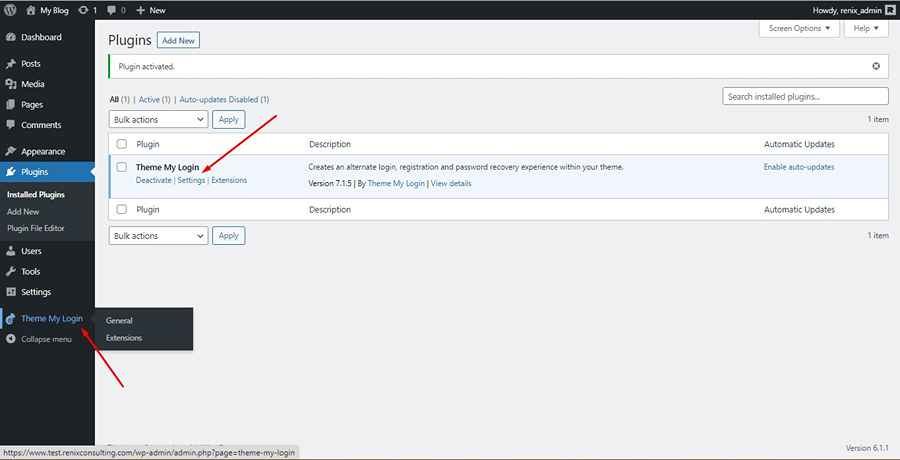
Screenshot of Theme My Login Settings Link

3. Change the login slug to any custom text you want. That’s all!

Screenshot of Theme My Login slug settings

4. You now have a new login link.

Screenshot of Theme My Login frontend Login page

Note-

  1. You can use shortcodes for this plugin, find out more here.
  2. You can use any of the following shortcodes
    • For login page: [theme-my-login]
    • For registration page: [theme-my-login action=”register”]
    • For the lost password page: [theme-my-login action=”lostpassword”]
    • For reset password page: [theme-my-login action=”resetpass”]
  3. You can purchase extensions to access more features like email subscriptions of users upon registration, etc.
Screenshot of Theme My Login Extensions

3. WPS Hide Login

1. Look for the WPS Hide Login plugin on the WordPress plugin directory.

Install and activate the plugin.

Screenshot of WPS Hide Login in WordPress directory

2. Navigate to the plugin settings page

Screenshot of WPS Hide Login settings

3. Change the login slug to any custom text you want. That’s all!

Screenshot of WPS Hide Login custom login and redirection URL

4. You now have a new login link.

Screenshot of WPS Hide Login saved page and new Login link

5. This is how the new login page looks on the front end of the site.
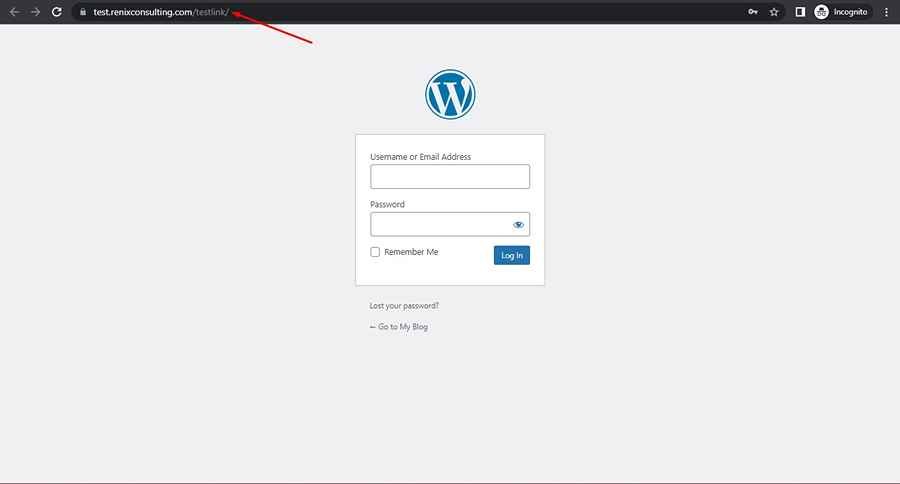
Screenshot of WPS Hide Login frontend Login page

Conclusion

The above 3 plugins do a good job of changing the login link for WordPress websites.

I will recommend you choose the Ultimate Dashboard plugin as it has more dashboard customization features like providing a lot of control over designing the login page, followed by the Theme My Login plugin, and lastly, the WPS Hide Login plugin.

Did you enjoy this post?

If so, please share it with your friends and followers on social media! It's a great way to help others learn about WordPress and to support our blog. You can use the share buttons below...

FREE QUOTE

December 29, 2023

Guide to set up Google Tag Manager on WordPress site (2025)


Read More

December 22, 2023

8 top profitable ad placements for your Nigerian WordPress website


Read More

December 21, 2023

Website caching: a guide to speeding up your WordPress website in Nigeria


Read More

November 10, 2023

Ultimate guide to identify, fix and prevent broken links on your Nigerian WordPress website


Read More

Elevate Your Brand with Professional Website Design

Discover how we can transform your online presence with professional website design services. We specialise in creating modern, user-friendly websites tailored for the medical, legal, university, and Christian sectors. If you're ready to elevate your brand and connect with your audience more effectively, contact us today to get started!

Our Services

Tutorials on YouTube

And if you’re looking for more in-depth WordPress tutorials,be sure to subscribe to our YouTube channel! We have a wide variety of videos on WordPress.

SUBSCRIBE

Add comment Cancel reply

This site uses Akismet to reduce spam. Learn how your comment data is processed.

  • 2 easy ways to customize your Nigerian WordPress site login page
  • Blog
  • 5 ways to protect your Nigerian WordPress domain name and hosting account
Renix RC Logo Black Medium

Renix Consulting is a website design agency, we help businesses of all sizes create beautiful, functional, and user-friendly websites that represent their brand and achieve their online goals.

Newsletter

Renix

Blog
About Us
Services
Portfolio
Project Questionnaire
Contact Us

Other Links

Affiliate Disclosure
Cookie Policy
Privacy Policy
Terms and Conditions

WP Resources

Terminologies
Software
Web design Tools

© 2026 Website Design Agency | Renix Consulting. All rights reserved
CHAT WITH US ON WHATSAPP
Hello 👋
Tell us about your website project here, we can't wait to hear from you.
Open chat